
From 8 engineering fixes a day to 1 a week: rebuilding a parking management platform’s operations portal from the ground up
Role
Team
Timeline
Scope
Impact overview
1 a week
engineering requests, after self-serve tools for ops and clients
2 days
cut from client onboarding with a restructured data model
60%
of property managers who wanted lot analytics now log in to see them
The wake up call
By the time this project started, the engineers were fielding manual requests from the operations team up to 8 times a day.
These weren’t bugs or emergencies. They were routine jobs the portal couldn’t do on its own, like a schedule change, a new client setup or a rate adjustment. Every one of those requests pulled an engineer away from product work to hand edit something in the backend.
The portal was built on legacy code that was no longer maintainable, and it was showing at the worst possible time. The client base was shifting toward accounts that needed far more autonomy and flexibility than the old system could give them. Ops had built an entire practice of workarounds to keep things running. Finance data didn’t reconcile properly. And as the platform scaled, everything got slower.
Patching the portal wasn’t going to be enough. We needed to rebuild it, including the data structure underneath, the workflows on top, and the trust between ops, clients, and engineering that had worn down along the way.
Finding out what was broken
I ran the research myself, shadowing the operations team through their day to day, interviewing them directly, and sending written surveys out to our largest clients.
The most useful moment of the project came early, and it surprised me.
Going in, I assumed the areas we’d flagged as priorities were where the pain lived. Sitting with ops for a few days proved that wrong. The features we thought mattered most were barely touched. The biggest time sinks were smaller and more repetitive, and easy to miss from the outside until I watched someone do the same small task 30 times in an afternoon.
Four problems came out of that process:
- Onboarding was bloated. Ops was routing around missing functionality by adding around 5 extra manual steps to every new client setup.
- Ops had become a human API. Small, routine client requests, like a schedule tweak or a property detail update, came in by email and ops made each change by hand, which ate hours every week.
- Clients were flying blind. Their biggest complaint by far was not having access to their own data. Every report meant emailing ops and waiting.
- Booking lookups were slow. When a parker called in, finding their booking took anywhere from 45 seconds to over 2 minutes, and longer for monthly bookings that started more than a month back.
- Bloated onboardingAround 5 extra manual steps per new client
- Ops as a human APIRoutine client edits arriving by email
- Clients flying blindEvery report meant emailing ops and waiting
- Slow booking lookupsHunting for info during live client calls
Onboarding friction, ops’ workload, client visibility, and slow booking lookups looked like four separate problems, but they all traced back to one root cause. The platform had no data structure connecting a client’s properties, so every feature built on top had to work around that gap in its own way. Fixing the structure once meant everything else could build on solid ground instead of being patched one by one.
1. Onboarding: fixing the foundation everything else sat on
The problem
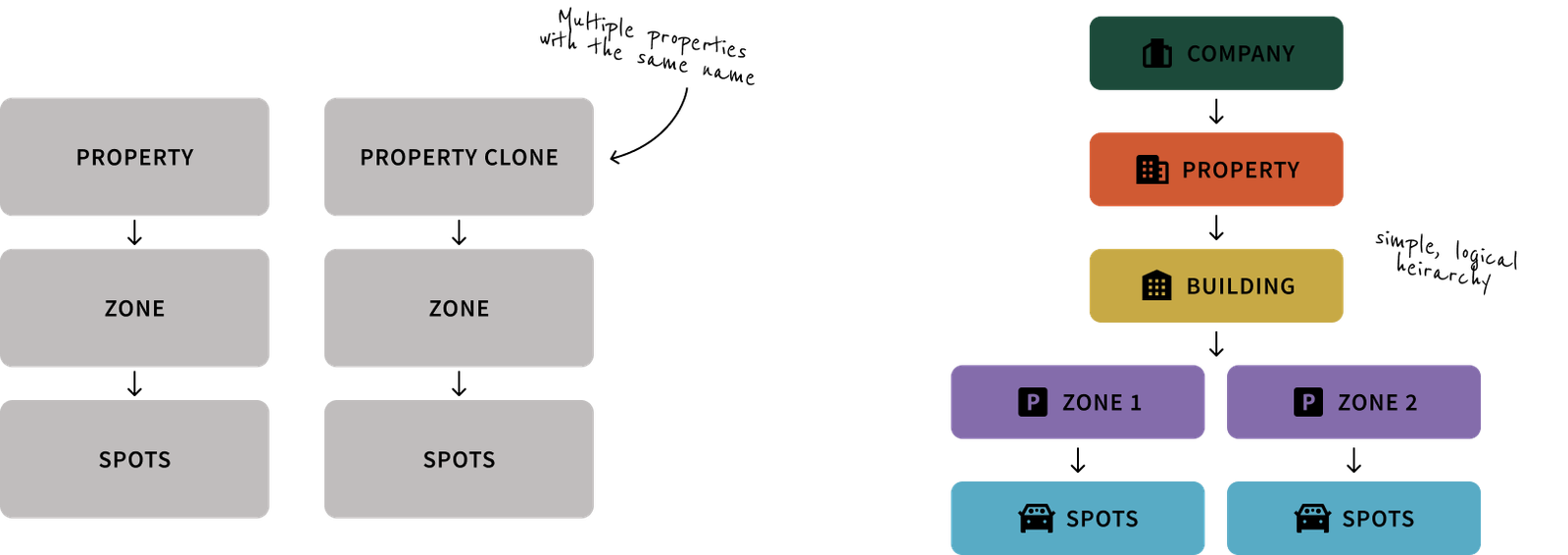
The old data model didn’t match how clients operated. If a company owned five lots, the system had no relationship between them. Each lot was added separately, with no link back to the parent company. Every lot could only carry one schedule and one parking type (hourly or monthly, never both). Whenever ops needed a different rate structure, they duplicated the whole property to attach a second schedule.
To keep track, ops came up with their own shorthand naming conventions, which then showed up, unedited, in the parker facing app.
On the client side, onboarding forms asked for information that was never used. A property also couldn’t go live until the client supplied details they often couldn’t access themselves, which left a stall that only ops could unblock.
What I built
I restructured how the platform modeled a client’s setup: Company, then Property (the lot itself), then Building, then Zones, then Spots. A spot can belong to more than one zone, and data now attaches at the level where it applies instead of being re-entered at every layer.
On top of that, I designed:
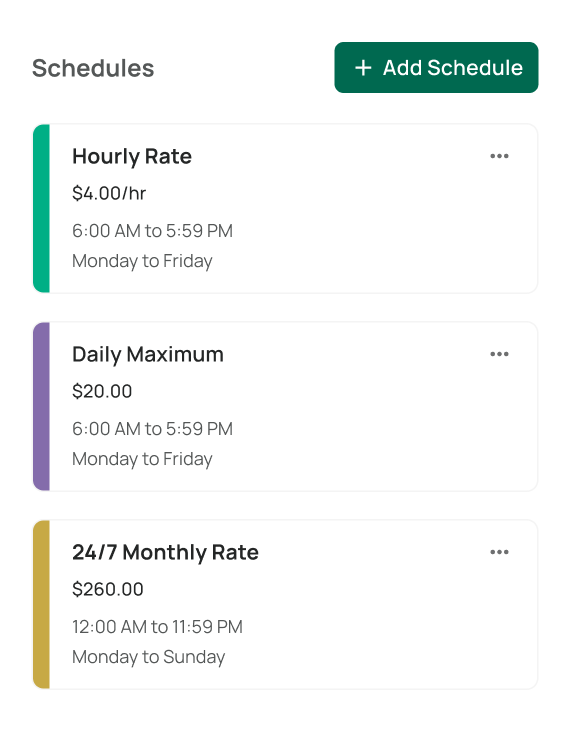
- A multi schedule system, so a single lot could carry several rate types and hour sets at once and ops no longer had to duplicate properties
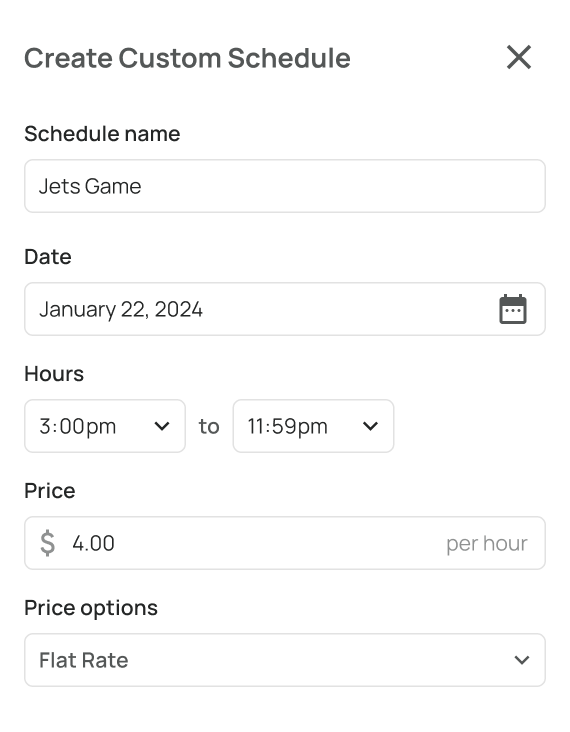
- Custom event scheduling, a temporary schedule and rate for a date range (a concert, a holiday) that reverts automatically afterward, so ops didn’t have to remember to undo it
Impact
| Metric | Result |
|---|---|
| Onboarding time | Down 2 days, by giving clients autonomy instead of routing through ops |
| Ops time on manual scheduling | Down 6 hours a week |
| Duplicate properties in the database | Down about a third |
Getting this right early mattered beyond onboarding. The same structure that ended duplicate properties made the next two areas possible. Permissions and the client dashboard only worked cleanly because data now lived at the right level, not scattered across duplicate records with no single source of truth.
2. Killing the email to ops loop
The problem
Even after onboarding, clients couldn’t make routine changes themselves. Every schedule adjustment, property update, or revenue question went through the same channel, an email to ops, about 25 a month. Ops then made each change by hand. It was slow for clients and a constant drain on ops.
What I built
A four tier permissions system, granted by ops at onboarding, that gave clients direct, scoped access to modify their own data:
- Admin, internal only, full system access
- Property Owner, full visibility and edit rights across their properties, including finance and data
- Property Manager, booking and property info, view level
- Enforcement Officer, basic parking details only, scoped to identifying violations
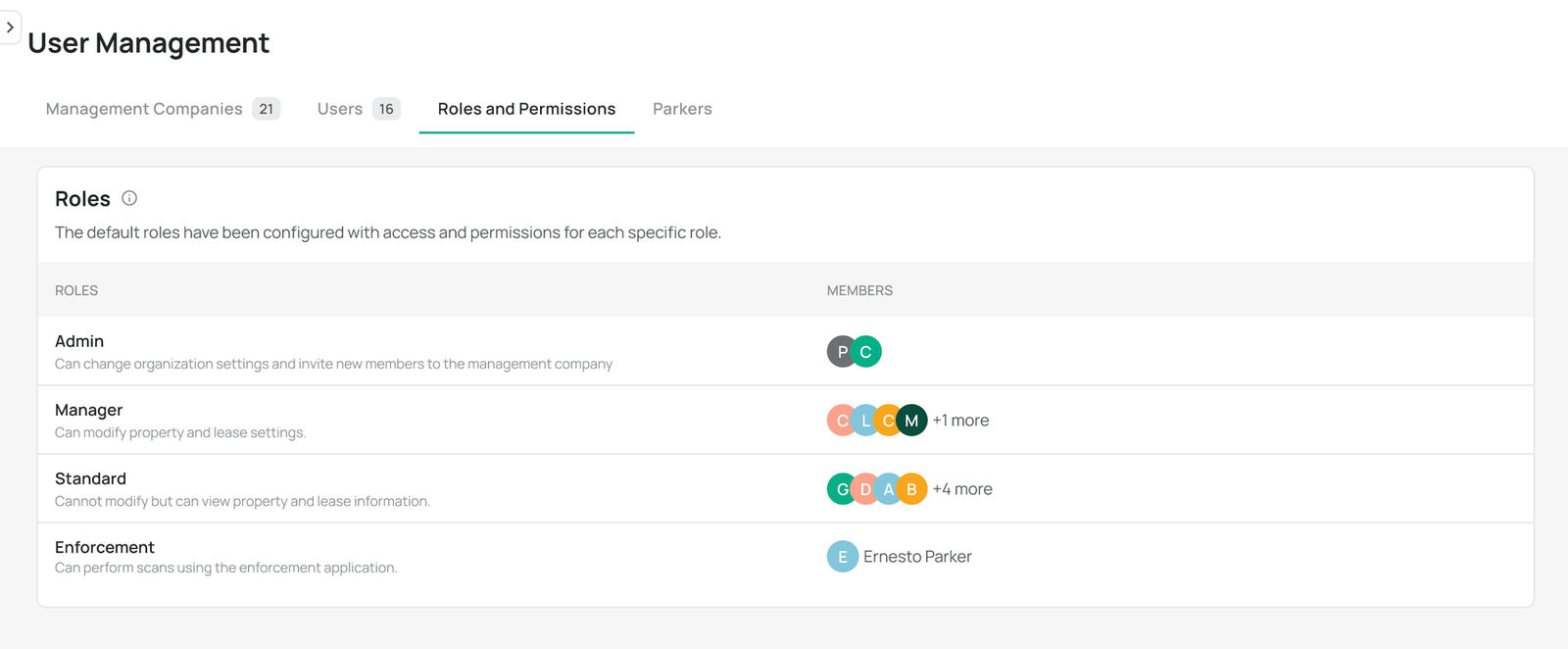
I defined all four tiers and exactly what each one could see and change. The product had never had permissions before, so this meant designing both the logic and the interface from scratch.
Impact
Routine edits stopped landing in ops’ inbox. Clients could now make those changes themselves, so the emails that still came in were the ones that needed a person.
3. Giving clients their own data
The problem
The Property Owner tier opened the door, but there was nothing behind it yet. Clients had no way to see their own performance data. Every report was a request, a wait, and a manual pull from ops.
What I built
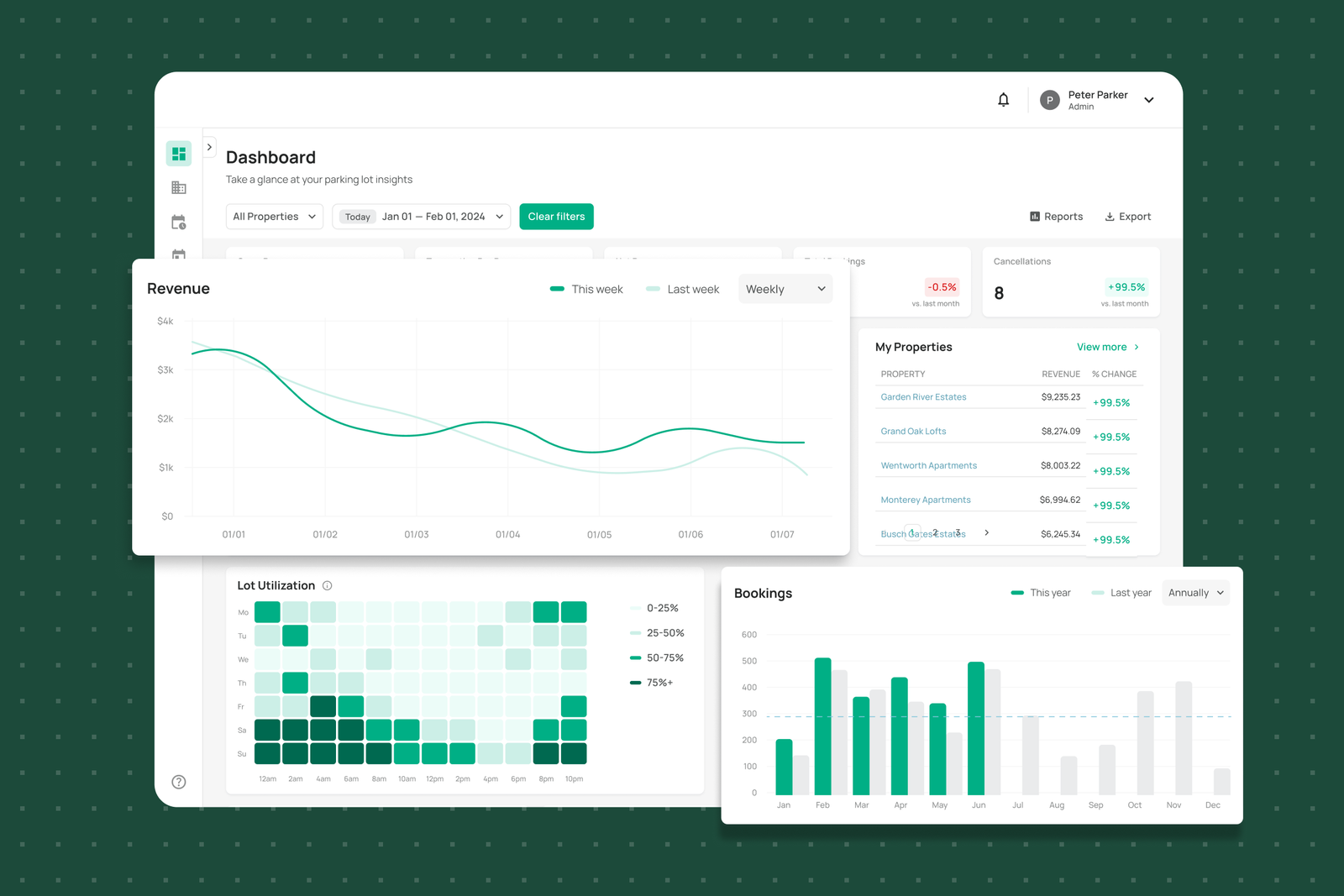
A client facing data dashboard, scoped by the new permissions structure and built directly on top of the onboarding redesign underneath it. It surfaced:
- Lot utilization
- Offense and violation history
- Detailed, accurate revenue breakdowns
Based on client feedback, I cut the dashboard down to the widgets clients used, instead of shipping everything we could technically show. Property Owners could also act on what they saw, adjusting schedules, toggling availability, or blocking spots without going through ops.
Impact
Before, fewer than 10% of the property managers who wanted lot analytics logged in to look at them. After launch, 60% did, and the dashboard became the main reason property managers logged in at all. Client tickets asking for data or reports fell from around 6 a quarter to 1 or 2.
4. Making booking info easy to find in real time
The problem
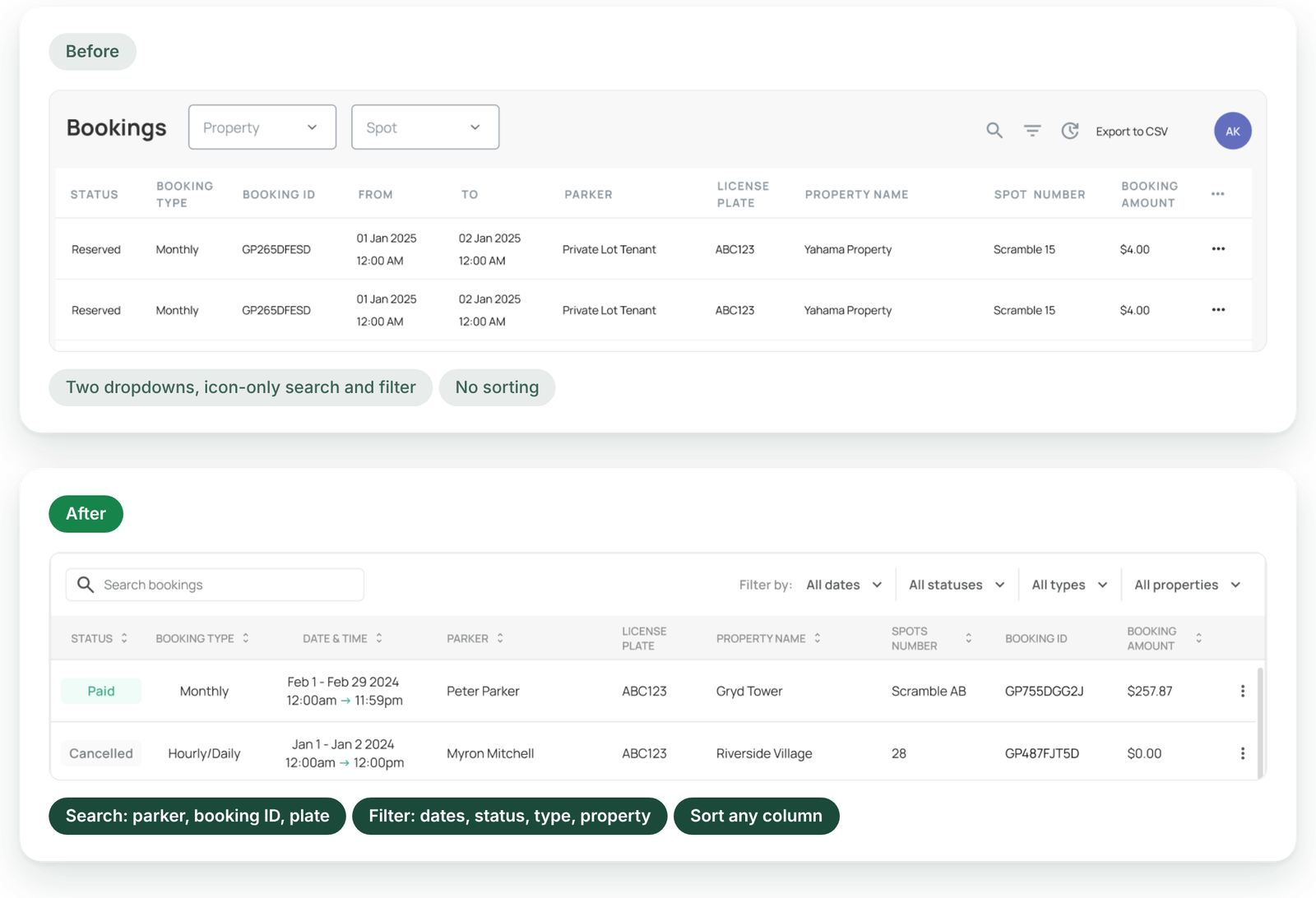
When a parker called in with an issue, ops needed to find their booking fast, and often couldn’t. A lookup took anywhere from 45 seconds to over 2 minutes, and longer for monthly bookings that started more than a month back. Search was limited, and filtering meant working through dropdowns. Guest checkouts made it worse, since every guest was logged as “Guest.”
What I built
I redesigned the booking table so ops could find a booking from whatever the parker had on hand. A search bar covers parker, booking ID, and license plate. A filter bar narrows by date, status, booking type, and property, and every column can be sorted. A plate number and a rough time are now enough to find the right booking.
I also added an Activity section to every booking that shows each change, when it was made, and by whom, so ops has a clear trail when resolving parker disputes.
Impact
Average resolution time on booking related support tickets dropped by 5 minutes per call, mostly because ops could search by plate or booking ID instead of digging through dropdowns.
Testing it with ops before launch
Every change went to ops before it went to clients. For a week, ops ran their daily workflows in the new design, and I made small fixes based on what slowed them down.
Most of the fixes were shortcuts the old portal had that I’d moved somewhere less convenient. One action ops used constantly had lived in the More menu, and I’d moved it into a panel. Putting it back in the More menu made that flow faster again. Once ops signed off, the redesign rolled out to all clients.
The outcome
Once the portal stopped being a bottleneck, the company could grow again.
- The platform’s scaling issues were resolved enough to launch in 3 new provinces
- Existing clients expanded, adding 5 new lots, contributing roughly a 5% increase in annual revenue
- Most importantly, the stable foundation made new products possible. The first was the enterprise portal, which lets companies manage parking for all their employees
What started as a legacy code rebuild ended up resetting the relationship between ops, clients, and engineering. Manual workarounds gave way to a system that could hold up as the company grew.
What I’d do differently
If I did this again, I’d build a proper migration path for existing data, not only fix how new properties got added. The hierarchy restructure solved the problem for anything created after launch, but ops still had to reconcile a chunk of the legacy duplicates by hand, so part of the original workload never fully went away. A migration tool built alongside the new structure would have closed that gap.
Let’s solve the right
problem together.